One-click character setup
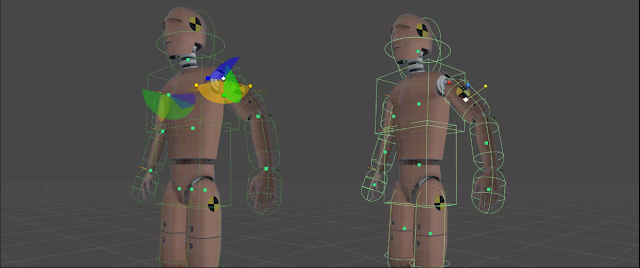
Build a Physicanim character from a humanoid model. Generate the bones, joints, rigidbodies and colliders that make up its active ragdoll.
Active ragdoll toolkit · Unity Asset Store
Create characters that move with the freedom of simulation and the intention of animation.
Physicanim turns a humanoid character into a physics-driven active ragdoll—with the setup tools and procedural behaviours to get you moving.
 Open-source toolkit · Also on GitHub
Meet Physicanim
Skip the repetitive rig setup. Build a physics-driven character from your humanoid model, then let it walk, run, jump, stumble, fall—and find its feet again.
01 / Made to move
Tools and behaviours that make physics-driven characters easier to create and bring into your project.
Build a Physicanim character from a humanoid model. Generate the bones, joints, rigidbodies and colliders that make up its active ragdoll.
Use your regular humanoid animation as a guide while the character responds through a physically simulated body.
Give characters the foundations to walk, run and jump, then trip, fall into a protective pose and get back up.
02 / See it in motion
Physicanim characters respond to movement, collisions and gravity. When they lose their balance, they can fall and recover instead of simply switching between fixed poses.
How Physicanim works
03 / A simpler starting point
Start with a humanoid character and animation you already know. Physicanim helps connect them to a physics-driven body.
Bring a humanoid-rigged character into your Unity scene.
Use the Physicanim editor to generate the active ragdoll setup.
Animate as usual and let the character move through physics simulation.
A character in action
See animation and simulation work together in this Physicanim roundhouse kick demonstration.
Made by Tilde Asterisk
After years of exploring ragdoll physics and procedural animation in Unity, we created Physicanim to make the character setup we kept repeating easier to create and reuse.
Tools for curious creators.